


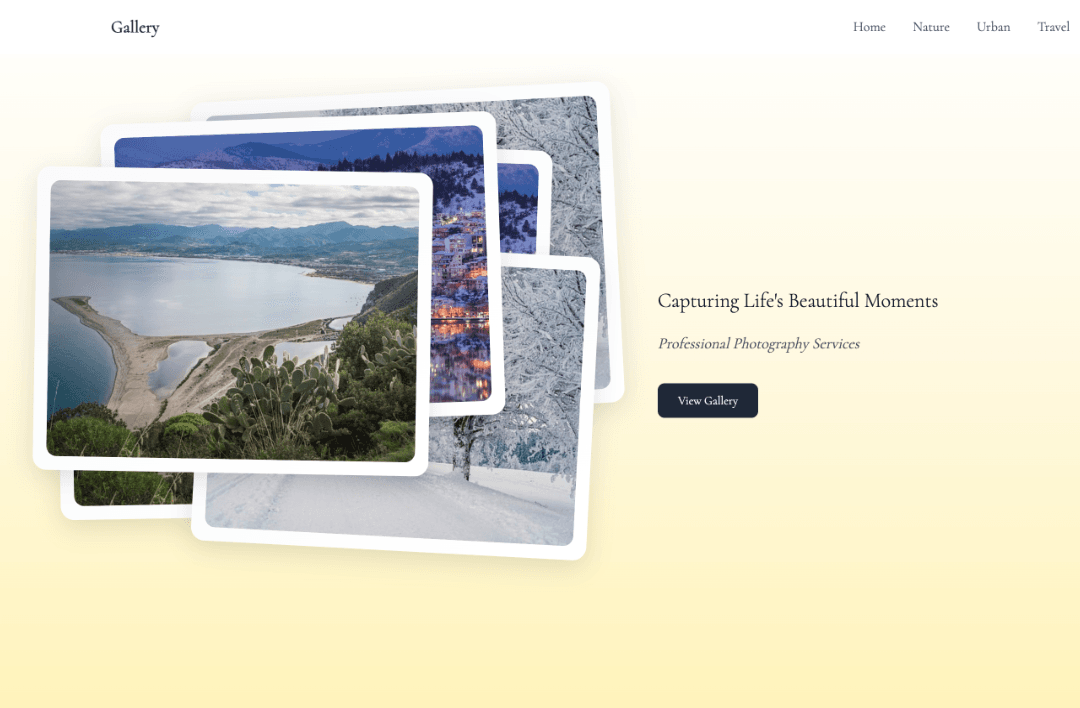
Nimmal Gallery(极简画廊)
Nimmal Gallery 是一个使用 Next.js 构建的现代图片展示网站模板。它提供了优雅的界面来展示您的摄影作品,支持分类展示、相册管理和响应式设计。
快速部署
您可以使用下方按钮快速部署到腾讯云 EdgeOne:

在线演示
🌐 在线预览:https://minimal-gallery.edgeone.app/
网站内容配置
首页内容
- 导航到
app/config/home.json - 根据您的需求修改内容:
{
  "hero": {
    "title": "您的标题",
    "subtitle": "您的副标题",
    "description": "您的描述",
    "cta": {
      "primary": "主按钮文本",
      "secondary": "次按钮文本"
    },
    "backgroundImage": "/images/hero-bg.jpg"
  },
  "featuredCollections": [
    {
      "id": "collection-1",
      "title": "收藏标题",
      "description": "收藏描述",
      "image": "/images/collection-1.jpg",
      "link": "/gallery/category"
    }
  ],
  "services": [
    {
      "id": "service-1",
      "title": "服务标题",
      "description": "服务描述",
      "icon": "icon-name"
    }
  ],
  "testimonials": [
    {
      "id": "testimonial-1",
      "content": "评价内容",
      "author": "作者名称",
      "role": "作者角色"
    }
  ]
}
画廊内容
- 导航到
app/config/gallery.json - 根据您的需求修改内容:
{
  "categories": {
    "nature": {
      "title": "自然",
      "description": "自然摄影收藏",
      "albums": [
        {
          "id": "nature-1",
          "title": "山脉之美",
          "description": "捕捉山脉景观的雄伟之美",
          "coverImage": "/images/gallery/nature/your-image.jpg",
          "photoCount": 4,
          "createdAt": "2024-03-15",
          "photos": [
            {
              "id": "photo-1",
              "url": "/images/gallery/nature/photo1.jpg",
              "title": "照片标题",
              "description": "照片描述"
            }
          ]
        }
      ]
    }
  }
}
图片资源
下载默认图片
- 访问 Unsplash 下载您喜欢的图片
- 按照以下结构将图片放在
public/images/gallery目录中:public/images/gallery/ ├── nature/ ├── urban/ ├── travel/ └── architecture/
项目结构
nimmal-gallery/
├── app/                    # Next.js 应用目录
│   ├── components/        # 可复用组件
│   ├── config/           # 配置文件
│   ├── gallery/          # 画廊相关页面
│   ├── types/            # TypeScript 类型定义
│   └── utils/            # 工具函数
├── public/               # 静态资源
│   └── images/          # 图片资源
└── out/                 # 构建输出目录
本地开发
-
克隆仓库
git clone https://github.com/tomcomtang/nimmal-gallery.git cd nimmal-gallery -
安装依赖
npm install -
启动开发服务器
npm run dev -
构建项目
npm run build -
预览构建结果
npm run start
技术栈
- Next.js 14
- React 18
- TypeScript
- Tailwind CSS
- ESLint
- Prettier
许可证
MIT 许可证